
QUILT PLANNING NOTES · UPDATED OCTOBER 26, 2026
Put your actual fabric in the plan.
A fabric photograph can tell you much more than a flat colour swatch—if the crop and scale are sensible. A little care with the photo makes the quilt preview more useful.
This is a practical photography guide, with examples from Cloth & Colour’s development preview. Fabric-photo importing works locally in the preview; the desktop app is not publicly released yet.
Fill the frame with fabric
Lay the fabric flat in even light. Hold the camera above it rather than at an angle. Make the fabric fill the whole frame: no table edges, hands, scissors or background. Smooth distracting folds, but avoid stretching the fabric. Keep a ruler beside the area while measuring, then leave the ruler out of the final crop.
Turn off decorative filters. Avoid a hard shadow from your phone or mixed sunlight and warm room light. Photograph several fabrics in the same lighting if you want to compare them.
Capture enough of the print
A tiny crop of a large floral may show only one petal. Include enough of the pattern to explain how it repeats. For a directional print, keep track of which edge is up. Save the original photograph separately so you can return to it if the first crop is too tight.
Crop before adding it to the quilt
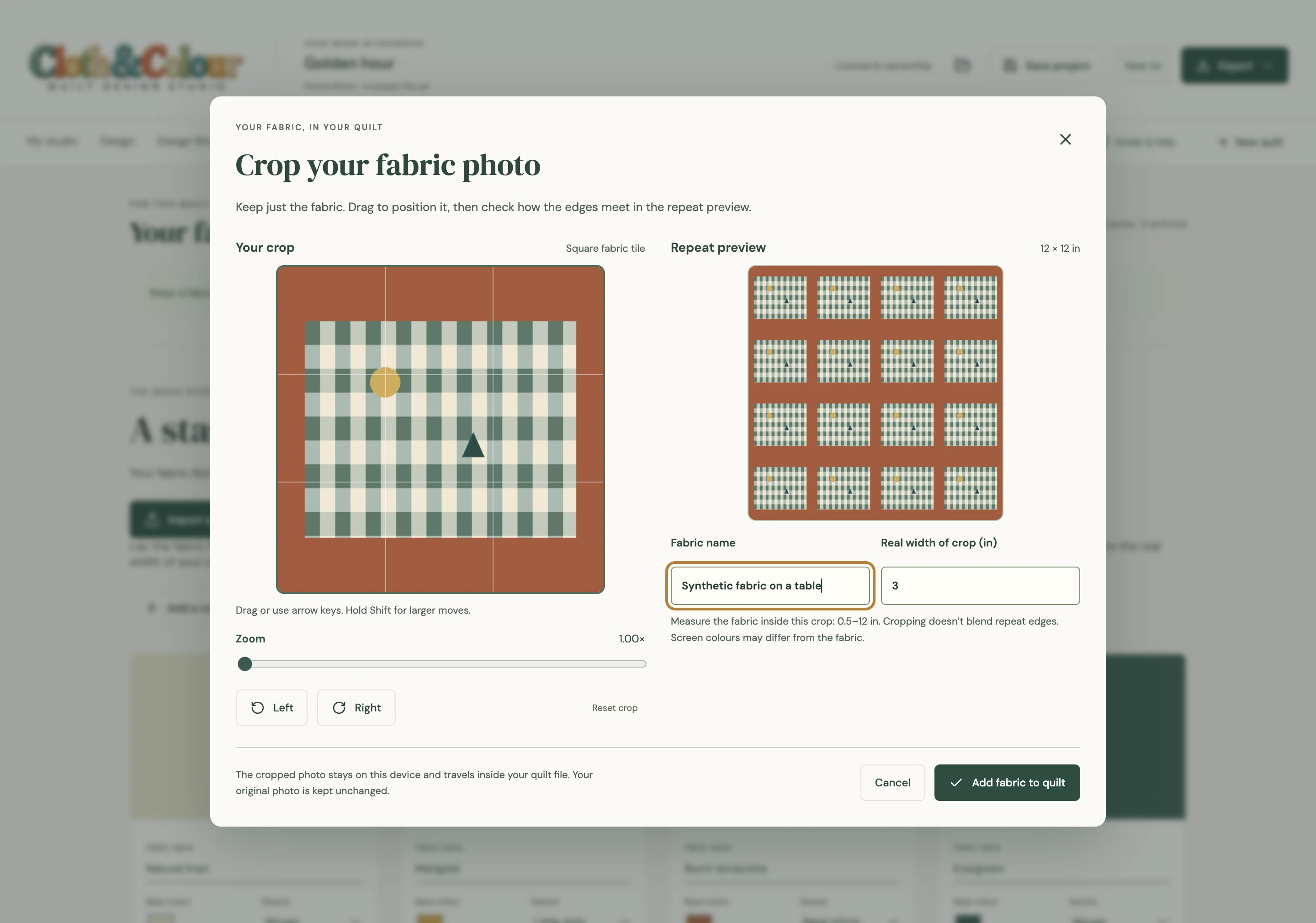
In the Cloth & Colour preview, choose Fabrics → Import a fabric photo. Use JPG, PNG or WebP under 5 MB. Rotate and zoom, then position the image with dragging or the arrow controls. Inspect the repeating-square preview before choosing Add fabric to quilt.
Crop out the entire background, not just most of it. The app does not automatically separate fabric from a table. It also does not magically make the edges of a cropped photograph seamless; a poor crop can create visible repeated lines.
Set a physical repeat width
The repeat width means the real-world width of your cropped square. Suppose your crop contains a square of fabric that measured 4 inches across. Set its repeat width to 4 inches. Do not enter the width of the whole bolt or an arbitrary camera resolution. Pixels are not physical inches.
If you crop again, reconsider the measurement. A smaller crop covers less physical fabric. A flower that looks enormous in a small block may be a scale-setting problem rather than a design problem.
Compare, then check with the real cloth
Paint the new fabric into a few pieces, zoom out and compare it with the other fabrics. In the preview, Crop / rotate photo updates uses of that fabric in the current quilt. If you need two different crops at once, keep them as separate fabric entries.
Screen colour depends on the display, camera and lighting. It cannot promise a match to the real textile. Put the actual fabrics together before buying yardage or cutting. Directional placement and motif matching need a physical plan too.
What stays on your computer
The preview imports and processes the cropped fabric locally. Keep an independent project or library backup as well as the original photograph. Adding a photograph is not a cloud backup and is not automatic conversion of a picture into a pieced quilt pattern.
Next: design a block using those fabrics or prepare a measured making plan.