
QUILT PLANNING NOTES · UPDATED OCTOBER 26, 2026
Design a block you can actually sew.
Start with a small grid and a construction method you understand. The aim is not to fill every square. It is to make a repeat that looks good, fits your quilt and can be assembled without surprises.
The planning advice works on paper or in quilt software. The named controls below refer to Cloth & Colour’s current development preview, not a public release.
1. Choose the finished block size
Write down the size after the block is sewn into the quilt. For a 12-inch finished block on a four-by-four grid, each grid position spans 3 finished inches. That does not mean you cut every square at 3 inches: cutting sizes depend on seam allowances and construction. Let your verified pattern or making plan distinguish finished and cutting dimensions.
2. Make the simplest version first
Begin with squares and half-square triangles. Put the dark pieces where you want the main shape, a medium value around them and a light background. Check the design in a small repeat before adding more pieces. More seams can create more opportunities for distortion without improving the design.
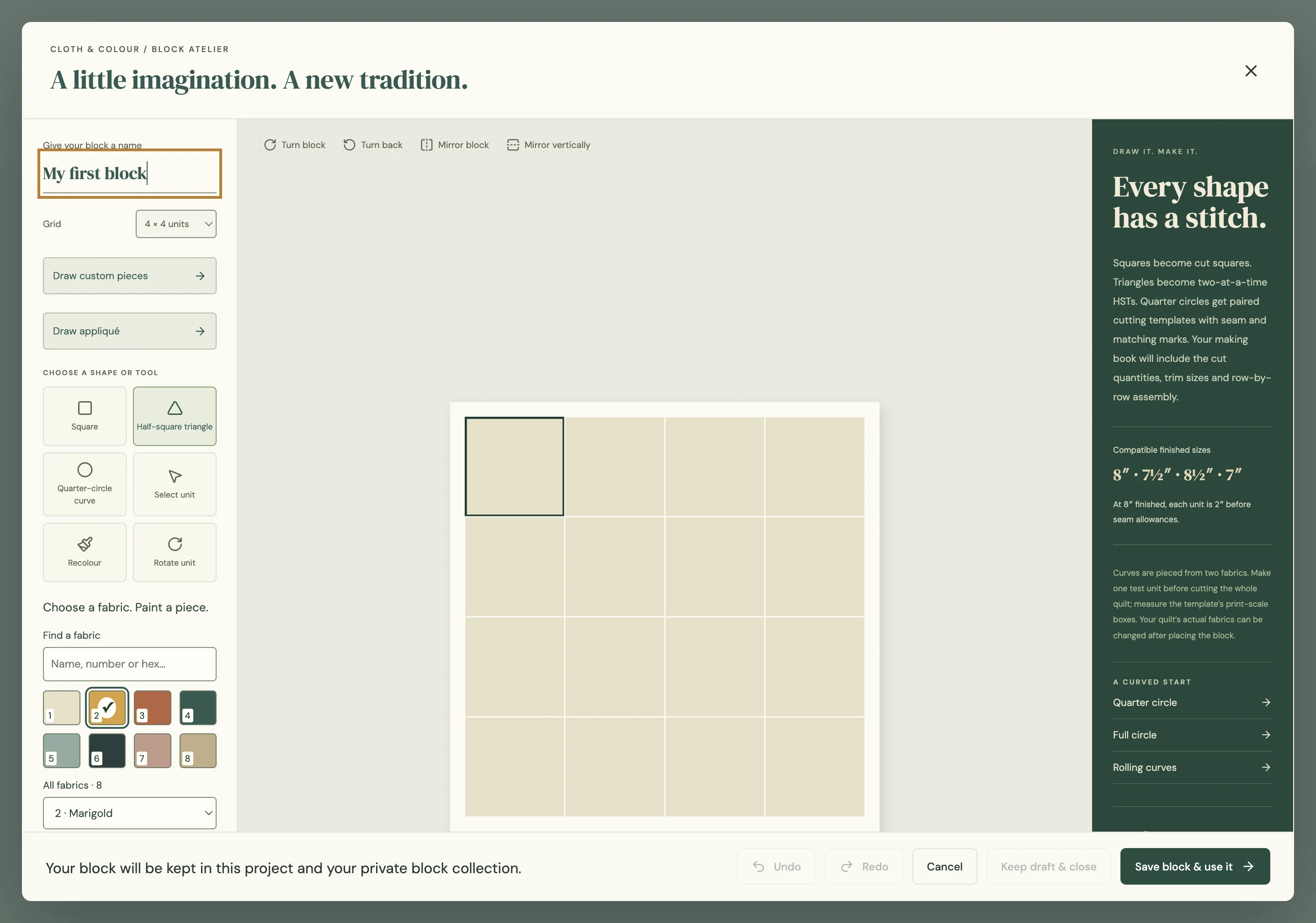
3. Paint the piece you mean
In the preview, open My blocks → Design a block. Choose a grid from 1–16 rows and 1–16 columns. Select a fabric on the left, then click the square or triangle you want to recolour. Add a custom colour when you need one. Use Undo after an accidental change.
Start with three or four fabrics even though projects can hold up to 256. A smaller working palette makes it easier to see whether a motif holds together. Fabric count is capacity, not a design target.
4. Test turns and mirrors
Rotate a unit or turn the entire block clockwise/counterclockwise. Try horizontal and vertical mirroring. Place four copies together and see what appears at their corners. A block that seems plain on its own can form a strong secondary design when repeated.
Directional fabric deserves another check: a rotated block may turn a bird or lettering sideways. Decide whether that is part of the design before cutting.
5. Save a usable version
Choose Save block & use it to keep the block in the project and local collection, then stamp it into your quilt. Export a portable .quiltblock copy for independent safekeeping. Local draft recovery is useful after an interruption; it is not a substitute for your own backup.
6. Sew one sample before a full quilt
Read the generated plan, check the finished size and try one block in spare fabric. Press it as you intend to press the quilt. Measure it after assembly. If it does not fit, resolve that discrepancy before multiplying the design across a large layout.
When a grid is not enough
The preview also has a constrained custom-piece editor for straight and quadratic curved seams. It is a separate workflow from grid units, with limits on shapes and assembly. A drawn outline is not automatically a reliable pattern; start with simple constructions and test them physically.
Next: bring your actual fabric into the mockup, check the printed plan or plan the full quilt layout.